Difference between revisions of "PublicHome/Software/Products/SpsMobile"
< PublicHome | Software | Products
(Added descriptions) |
|||
| Line 23: | Line 23: | ||
<gallery mode="packed" heights="300"> | <gallery mode="packed" heights="300"> | ||
File:SpSMobile-Map-View.png|Visually Map the travel route while showing Sensor status overview | File:SpSMobile-Map-View.png|Visually Map the travel route while showing Sensor status overview | ||
| − | File:SpSMobile-Backup-Data.jpg| Manually Sync sensor data to Spartan Sense or Export to Excel | + | File:SpSMobile-Backup-Data.jpg|Manually Sync sensor data to Spartan Sense or Export to Excel |
| − | File:SpSMobile-Sensor-Details.jpg| Real-time Overview and Details of TPMS / Temptrac Sensor data | + | File:SpSMobile-Sensor-Details.jpg|Real-time Overview and Details of TPMS / Temptrac Sensor data |
| − | File:SpSMobile-Sensor-Alert-Details.png| Detailed Temperature and Pressure Information at fingertips | + | File:SpSMobile-Sensor-Alert-Details.png|Detailed Temperature and Pressure Information at fingertips |
| − | File:SpSMobile-Email-Alerts.jpg| Email Alert Notifications | + | File:SpSMobile-Email-Alerts.jpg|Email Alert Notifications |
| − | File:SpSMobile-Contacts-Config-Page.jpg| Highly Configurable to meet | + | File:SpSMobile-Contacts-Config-Page.jpg|Highly Configurable to meet Fleet needs and preferences |
</gallery> | </gallery> | ||
Revision as of 13:14, 22 November 2019
Spartan Sense Mobile Application Software Product resources available to SpartanLync Customers and Partners
Spartan Sense Mobile Software Documents
- **IMPORTANT** FAQ - Frequently Asked Questions
Installing Spartan Sense Mobile
Look for the Spartan Sense Mobile App on the Android Play Store using the URL https://play.google.com/store/apps/details?id=com.spartanlync.spartansensemobile
OR
by searching for "Spartan Sense Mobile" manually within the Android Play Store

SpsMobileApp on PlayStore
Gallery Tour of Spartan Sense Mobile
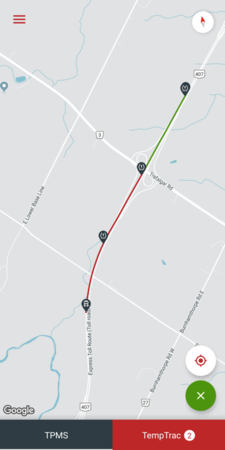
Visually Map the travel route while showing Sensor status overview

Manually Sync sensor data to Spartan Sense or Export to Excel

Real-time Overview and Details of TPMS / Temptrac Sensor data

Detailed Temperature and Pressure Information at fingertips

Email Alert Notifications

Highly Configurable to meet Fleet needs and preferences


