Difference between revisions of "PublicHome/Software/Products/SplX23"
| Line 18: | Line 18: | ||
<gallery mode="packed" heights="260px"> | <gallery mode="packed" heights="260px"> | ||
| − | File:SplX23-Vehicle-01-Producer.png|Photoreal graphics for a full Train — | + | File:SplX23-Vehicle-01-Producer.png|Photoreal graphics for a full Train — Tractor, trailer (up to 7 axles) and dolly (up to 2 axles) |
| − | File:SplX23-Explore-00.png|Discover every Train — | + | File:SplX23-Explore-00.png|Discover every Train — Over the CAN bus or Bluetooth |
File:SplX23-TPMS-01-TPMS-Summary.png|Live pressure and temperature on every wheel | File:SplX23-TPMS-01-TPMS-Summary.png|Live pressure and temperature on every wheel | ||
</gallery> | </gallery> | ||
| Line 26: | Line 26: | ||
* '''All your sensors, one App''' — TPMS pressure & temperature, standard-pressure baselines, temperature-warning thresholds, TempTrac reefer zones and Door Status. | * '''All your sensors, one App''' — TPMS pressure & temperature, standard-pressure baselines, temperature-warning thresholds, TempTrac reefer zones and Door Status. | ||
| − | * '''Every platform''' — iOS, Android, Windows and macOS (Intel & Apple Silicon). | + | * '''Every platform''' — Native apps for iOS, Android, Windows and macOS (Intel & Apple Silicon). |
* '''Two ways to connect''' — Bluetooth (BLE) on mobile, or a wired RP1210 / USB-Serial CAN adapter on desktop. | * '''Two ways to connect''' — Bluetooth (BLE) on mobile, or a wired RP1210 / USB-Serial CAN adapter on desktop. | ||
| − | * '''Fleet-Share''' — | + | * '''Fleet-Share''' — Sign in to publish live Train status to your Fleet, and view Trains shared by others. Always behind a secure login, always owner-controlled. |
| − | * '''Drag-and-drop setup''' — | + | * '''Drag-and-drop setup''' — Scan your fleet, drop vehicles into Fleets and Groups. No typing. |
| − | * '''Guided wizards''' — | + | * '''Guided wizards''' — Configure Nodes and the TPMS controller from scratch; assign sensors by scanning a QR / Barcode. |
| − | * '''Firmware updates''' — | + | * '''Firmware updates''' — Update the TPMS Controller right from the Desktop App. |
* '''Multi-lingual''' — English, Spanish and French. | * '''Multi-lingual''' — English, Spanish and French. | ||
| Line 55: | Line 55: | ||
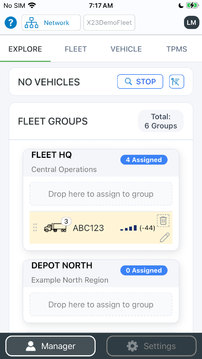
File:SplX23-Explore-01-Scanning-Unassigned.png|Live scan surfaces unassigned vehicles | File:SplX23-Explore-01-Scanning-Unassigned.png|Live scan surfaces unassigned vehicles | ||
File:SplX23-Explore-01-Scanning-FleetGrouped.png|Discovered Trains snap into their Groups automatically | File:SplX23-Explore-01-Scanning-FleetGrouped.png|Discovered Trains snap into their Groups automatically | ||
| − | File:SplX23-Explore-02-Drag-Drop-01.png|Drag-and-drop into Groups — | + | File:SplX23-Explore-02-Drag-Drop-01.png|Drag-and-drop into Groups — No typing |
File:SplX23-Explore-03-Producer-FleetGrouped.png|Producers publish live status to the Fleet | File:SplX23-Explore-03-Producer-FleetGrouped.png|Producers publish live status to the Fleet | ||
| − | File:SplX23-Explore-04-Consumer-FleetShare-Privacy.png|Consumers view shared Trains — | + | File:SplX23-Explore-04-Consumer-FleetShare-Privacy.png|Consumers view shared Trains — Privacy stays in your hands |
</gallery> | </gallery> | ||
| − | == Fleet — your whole operation at a glance == | + | == Fleet — monitor your whole operation at a glance == |
<gallery mode="packed" heights="240px"> | <gallery mode="packed" heights="240px"> | ||
| Line 68: | Line 68: | ||
File:SplX23-Fleet-03-Producer-FleetGrouped-Scanned.png|Scanned Trains merge with shared Fleet data | File:SplX23-Fleet-03-Producer-FleetGrouped-Scanned.png|Scanned Trains merge with shared Fleet data | ||
File:SplX23-Fleet-03-Producer-FleetShare-Privacy.png|Choose exactly which Trains you share | File:SplX23-Fleet-03-Producer-FleetShare-Privacy.png|Choose exactly which Trains you share | ||
| − | File:SplX23-Fleet-04-Consumer-FleetShare-GREEN.png|Green — | + | File:SplX23-Fleet-04-Consumer-FleetShare-GREEN.png|Green — All sensors healthy |
| − | File:SplX23-Fleet-04-Consumer-FleetShare-AMBER.png|Amber — | + | File:SplX23-Fleet-04-Consumer-FleetShare-AMBER.png|Amber — An alert needs attention |
File:SplX23-Fleet-04-Consumer-FleetShare-AMBER-Details.png|Drill into any alert for detail | File:SplX23-Fleet-04-Consumer-FleetShare-AMBER-Details.png|Drill into any alert for detail | ||
</gallery> | </gallery> | ||
| Line 79: | Line 79: | ||
File:SplX23-TPMS-01-TPMS-Details.png|Tap any tire for full detail | File:SplX23-TPMS-01-TPMS-Details.png|Tap any tire for full detail | ||
File:SplX23-TPMS-01-TPMS-TireDetails.png|Pressure, temperature, battery and sensor ID | File:SplX23-TPMS-01-TPMS-TireDetails.png|Pressure, temperature, battery and sensor ID | ||
| − | File:SplX23-TPMS-01-TPMS-Editor-Sensors.png|Assign sensors by QR / | + | File:SplX23-TPMS-01-TPMS-Editor-Sensors.png|Assign sensors by QR / Barcode scan |
File:SplX23-TPMS-01-TPMS-Editor-StdPress.png|Set standard-pressure baselines | File:SplX23-TPMS-01-TPMS-Editor-StdPress.png|Set standard-pressure baselines | ||
File:SplX23-TPMS-01-TPMS-Editor-TempWarn.png|Configure temperature-warning thresholds | File:SplX23-TPMS-01-TPMS-Editor-TempWarn.png|Configure temperature-warning thresholds | ||
| Line 88: | Line 88: | ||
<gallery mode="packed" heights="240px"> | <gallery mode="packed" heights="240px"> | ||
File:SplX23-TPMS-02-StdPress-Summary.png|Pressure deviation at a glance | File:SplX23-TPMS-02-StdPress-Summary.png|Pressure deviation at a glance | ||
| − | File:SplX23-TPMS-01-TPMS-StdPressDetails.png|Over- and | + | File:SplX23-TPMS-01-TPMS-StdPressDetails.png|Over- and Under-inflation flagged automatically |
File:SplX23-TPMS-03-TempWarn-Summary.png|Temperature-warning summary | File:SplX23-TPMS-03-TempWarn-Summary.png|Temperature-warning summary | ||
File:SplX23-TPMS-01-TPMS-TempWarnDetails.png|Hot-running tires caught early | File:SplX23-TPMS-01-TPMS-TempWarnDetails.png|Hot-running tires caught early | ||
| Line 105: | Line 105: | ||
<gallery mode="packed" heights="240px"> | <gallery mode="packed" heights="240px"> | ||
| − | File:SplX23-TPMS-05-DoorStatus-Summary.png|Open / | + | File:SplX23-TPMS-05-DoorStatus-Summary.png|Open / Closed at a glance |
| + | File:SplX23-TPMS-05-DoorStatus-Details.png|Live status per door | ||
| + | File:SplX23-TPMS-05-DoorStatus-ZoneDetails.png|Per-zone door monitoring | ||
| + | File:SplX23-TPMS-05-DoorStatus-Editor-Scopes.png|Define door zones | ||
| + | File:SplX23-TPMS-05-DoorStatus-Editor-Sensors.png|Assign door sensors | ||
| + | </gallery> | ||
| + | |||
| + | == Account & Administration == | ||
| + | |||
| + | <gallery mode="packed" heights="240px"> | ||
| + | File:SplX23-Settings-01-UserAccountCfg.png|Sign in to unlock Fleet-Share and cloud history | ||
| + | File:SplX23-TPMS-99-AdminMenu-00.png|Advanced diagnostics and firmware tools | ||
| + | </gallery> | ||
| + | |||
| + | = Privacy = | ||
| + | |||
| + | See the [[PublicHome/Software/Products/SplX23/PrivacyPolicy|X23 Manager Privacy Policy]] for how the App handles your data, including Fleet-Share. | ||
| + | |||
| + | = Support = | ||
| + | |||
| + | Questions? Contact us at [mailto:support@spartanlync.com support@spartanlync.com]. | ||
| + | That exact line is already fixed in the version I gave you a moment ago — it now reads Amber — An alert needs attention. If you're still seeing the lowercase "an", you're looking at the live wiki page, which won't change until you paste the latest full page in and purge. | ||
| + | |||
| + | But your feedback tells me something useful: the same rule should apply to the section sub-headings, which I hadn't caught. Those use the same Label — description format with a lowercase word after the dash: | ||
| + | |||
| + | Explore — discover… → Explore — Discover… | ||
| + | Fleet — monitor… → Fleet — Monitor… | ||
| + | TPMS — tire pressure… → TPMS — Tire pressure… | ||
| + | TempTrac — multi-zone… → TempTrac — Multi-zone… | ||
| + | I've applied that here so you don't have to flag them one by one. Full page below. | ||
| + | |||
| + | Product Page | ||
| + | Paste into https://help.spartansense.com/PublicHome/Software/Products/SplX23 | ||
| + | |||
| + | |||
| + | '''SpartanLync X23''' is a complete tire, temperature and door monitoring system for your fleet. | ||
| + | |||
| + | It pairs rugged '''Gateway/Node''' hardware on the vehicle with the cross-platform '''X23 Manager (X23-Mgr)''' App — so a driver, technician or fleet manager can see the health of every wheel, reefer zone and door at a glance, at the vehicle or across the Fleet. | ||
| + | |||
| + | This page is a resource for SpartanLync Customers and Partners. | ||
| + | |||
| + | __TOC__ | ||
| + | |||
| + | = What is the X23 System? = | ||
| + | |||
| + | The X23 System has two parts that work together: | ||
| + | |||
| + | ; Gateway/Node hardware | ||
| + | : A rugged on-vehicle device. It reads TPMS, TempTrac and Door sensors over the '''J1939 / CAN bus''' and groups tractors, trailers and dollies into a "'''Train'''". It links to your phone, tablet or desktop over '''Bluetooth (BLE)''' or a wired '''CAN adapter'''. | ||
| + | |||
| + | ; X23 Manager (X23-Mgr) App | ||
| + | : The client software on this page. It discovers Trains, shows their sensors on photoreal vehicle graphics, configures the TPMS controller, and — once you sign in — securely shares live Train status across your Fleet. | ||
| + | |||
| + | <gallery mode="packed" heights="260px"> | ||
| + | File:SplX23-Vehicle-01-Producer.png|Photoreal graphics for a full Train — Tractor, trailer (up to 7 axles) and dolly (up to 2 axles) | ||
| + | File:SplX23-Explore-00.png|Discover every Train — Over the CAN bus or Bluetooth | ||
| + | File:SplX23-TPMS-01-TPMS-Summary.png|Live pressure and temperature on every wheel | ||
| + | </gallery> | ||
| + | |||
| + | = Key Features = | ||
| + | |||
| + | * '''All your sensors, one App''' — TPMS pressure & temperature, standard-pressure baselines, temperature-warning thresholds, TempTrac reefer zones and Door Status. | ||
| + | * '''Every platform''' — Native apps for iOS, Android, Windows and macOS (Intel & Apple Silicon). | ||
| + | * '''Two ways to connect''' — Bluetooth (BLE) on mobile, or a wired RP1210 / USB-Serial CAN adapter on desktop. | ||
| + | * '''Fleet-Share''' — Sign in to publish live Train status to your Fleet, and view Trains shared by others. Always behind a secure login, always owner-controlled. | ||
| + | * '''Drag-and-drop setup''' — Scan your fleet, drop vehicles into Fleets and Groups. No typing. | ||
| + | * '''Guided wizards''' — Configure Nodes and the TPMS controller from scratch; assign sensors by scanning a QR / Barcode. | ||
| + | * '''Firmware updates''' — Update the TPMS Controller right from the Desktop App. | ||
| + | * '''Multi-lingual''' — English, Spanish and French. | ||
| + | |||
| + | = Get the App = | ||
| + | |||
| + | Available for mobile and desktop: | ||
| + | |||
| + | * '''Android''' — [https://PLACEHOLDER-GOOGLE-PLAY-URL Get X23-Mgr on Google Play] | ||
| + | * '''Apple iOS / iPadOS''' — [https://PLACEHOLDER-APP-STORE-URL Download on the Apple App Store] | ||
| + | * '''Windows / macOS Desktop''' — [https://drive.google.com/drive/folders/136ThaDwwfyvGk55hmc0_jA2eh8jm1CQ1 Download the X23-Mgr Desktop App] | ||
| + | |||
| + | Open the '''Explore''' tab and the App scans for nearby Trains automatically — over Bluetooth on mobile, or your CAN adapter on desktop. | ||
| + | |||
| + | Sign in with your SpartanLync account to unlock '''Fleet-Share'''. | ||
| + | |||
| + | = Gallery Tour = | ||
| + | |||
| + | A screen-by-screen tour of the App. Click any image to enlarge. | ||
| + | |||
| + | == Explore — Discover and organize your fleet == | ||
| + | |||
| + | <gallery mode="packed" heights="240px"> | ||
| + | File:SplX23-Explore-01-Scanning-Unassigned.png|Live scan surfaces unassigned vehicles | ||
| + | File:SplX23-Explore-01-Scanning-FleetGrouped.png|Discovered Trains snap into their Groups automatically | ||
| + | File:SplX23-Explore-02-Drag-Drop-01.png|Drag-and-drop into Groups — No typing | ||
| + | File:SplX23-Explore-03-Producer-FleetGrouped.png|Producers publish live status to the Fleet | ||
| + | File:SplX23-Explore-04-Consumer-FleetShare-Privacy.png|Consumers view shared Trains — Privacy stays in your hands | ||
| + | </gallery> | ||
| + | |||
| + | == Fleet — Monitor your whole operation at a glance == | ||
| + | |||
| + | <gallery mode="packed" heights="240px"> | ||
| + | File:SplX23-Fleet-01-EditFleet.png|Organize your operation into Fleets | ||
| + | File:SplX23-Fleet-02-CreateGroup.png|Create Groups for yards, routes or customers | ||
| + | File:SplX23-Fleet-03-Producer-FleetGrouped.png|Every Train grouped and monitored | ||
| + | File:SplX23-Fleet-03-Producer-FleetGrouped-Scanned.png|Scanned Trains merge with shared Fleet data | ||
| + | File:SplX23-Fleet-03-Producer-FleetShare-Privacy.png|Choose exactly which Trains you share | ||
| + | File:SplX23-Fleet-04-Consumer-FleetShare-GREEN.png|Green — All sensors healthy | ||
| + | File:SplX23-Fleet-04-Consumer-FleetShare-AMBER.png|Amber — An alert needs attention | ||
| + | File:SplX23-Fleet-04-Consumer-FleetShare-AMBER-Details.png|Drill into any alert for detail | ||
| + | </gallery> | ||
| + | |||
| + | == TPMS — Tire pressure & temperature == | ||
| + | |||
| + | <gallery mode="packed" heights="240px"> | ||
| + | File:SplX23-TPMS-00-Menu-TPMS.png|One menu, five monitoring systems | ||
| + | File:SplX23-TPMS-01-TPMS-Details.png|Tap any tire for full detail | ||
| + | File:SplX23-TPMS-01-TPMS-TireDetails.png|Pressure, temperature, battery and sensor ID | ||
| + | File:SplX23-TPMS-01-TPMS-Editor-Sensors.png|Assign sensors by QR / Barcode scan | ||
| + | File:SplX23-TPMS-01-TPMS-Editor-StdPress.png|Set standard-pressure baselines | ||
| + | File:SplX23-TPMS-01-TPMS-Editor-TempWarn.png|Configure temperature-warning thresholds | ||
| + | </gallery> | ||
| + | |||
| + | == Standard Pressure & Temperature Warning == | ||
| + | |||
| + | <gallery mode="packed" heights="240px"> | ||
| + | File:SplX23-TPMS-02-StdPress-Summary.png|Pressure deviation at a glance | ||
| + | File:SplX23-TPMS-01-TPMS-StdPressDetails.png|Over- and Under-inflation flagged automatically | ||
| + | File:SplX23-TPMS-03-TempWarn-Summary.png|Temperature-warning summary | ||
| + | File:SplX23-TPMS-01-TPMS-TempWarnDetails.png|Hot-running tires caught early | ||
| + | </gallery> | ||
| + | |||
| + | == TempTrac — Multi-zone reefer temperature == | ||
| + | |||
| + | <gallery mode="packed" heights="240px"> | ||
| + | File:SplX23-TPMS-04-TempTrac-Details.png|Monitor multiple reefer zones | ||
| + | File:SplX23-TPMS-04-TempTrac-ZoneDetails.png|Per-zone temperature detail | ||
| + | File:SplX23-TPMS-04-TempTrac-Editor-Scopes.png|Define temperature zones | ||
| + | File:SplX23-TPMS-04-TempTrac-Editor-Sensors.png|Map sensors to each zone | ||
| + | </gallery> | ||
| + | |||
| + | == Door Status == | ||
| + | |||
| + | <gallery mode="packed" heights="240px"> | ||
| + | File:SplX23-TPMS-05-DoorStatus-Summary.png|Open / Closed at a glance | ||
File:SplX23-TPMS-05-DoorStatus-Details.png|Live status per door | File:SplX23-TPMS-05-DoorStatus-Details.png|Live status per door | ||
File:SplX23-TPMS-05-DoorStatus-ZoneDetails.png|Per-zone door monitoring | File:SplX23-TPMS-05-DoorStatus-ZoneDetails.png|Per-zone door monitoring | ||
Revision as of 08:42, 28 July 2026
SpartanLync X23 is a complete tire, temperature and door monitoring system for your fleet.
It pairs rugged Gateway/Node hardware on the vehicle with the cross-platform X23 Manager (X23-Mgr) App — so a driver, technician or fleet manager can see the health of every wheel, reefer zone and door at a glance, at the vehicle or across the Fleet.
This page is a resource for SpartanLync Customers and Partners.
Contents
What is the X23 System?
The X23 System has two parts that work together:
- Gateway/Node hardware
- A rugged on-vehicle device. It reads TPMS, TempTrac and Door sensors over the J1939 / CAN bus and groups tractors, trailers and dollies into a "Train". It links to your phone, tablet or desktop over Bluetooth (BLE) or a wired CAN adapter.
- X23 Manager (X23-Mgr) App
- The client software on this page. It discovers Trains, shows their sensors on photoreal vehicle graphics, configures the TPMS controller, and — once you sign in — securely shares live Train status across your Fleet.
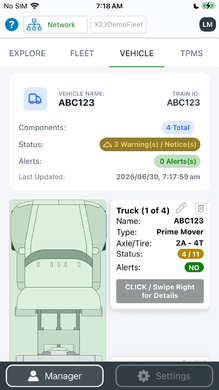
Photoreal graphics for a full Train — Tractor, trailer (up to 7 axles) and dolly (up to 2 axles)
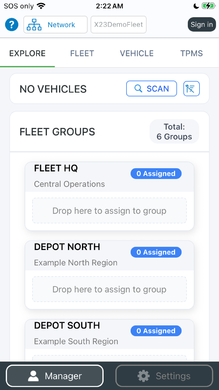
Discover every Train — Over the CAN bus or Bluetooth
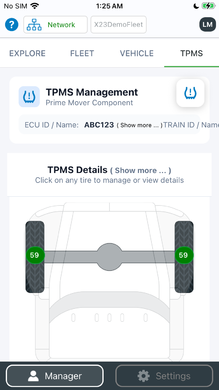
Live pressure and temperature on every wheel


Key Features
- All your sensors, one App — TPMS pressure & temperature, standard-pressure baselines, temperature-warning thresholds, TempTrac reefer zones and Door Status.
- Every platform — Native apps for iOS, Android, Windows and macOS (Intel & Apple Silicon).
- Two ways to connect — Bluetooth (BLE) on mobile, or a wired RP1210 / USB-Serial CAN adapter on desktop.
- Fleet-Share — Sign in to publish live Train status to your Fleet, and view Trains shared by others. Always behind a secure login, always owner-controlled.
- Drag-and-drop setup — Scan your fleet, drop vehicles into Fleets and Groups. No typing.
- Guided wizards — Configure Nodes and the TPMS controller from scratch; assign sensors by scanning a QR / Barcode.
- Firmware updates — Update the TPMS Controller right from the Desktop App.
- Multi-lingual — English, Spanish and French.
Get the App
Available for mobile and desktop:
- Android — Get X23-Mgr on Google Play
- Apple iOS / iPadOS — Download on the Apple App Store
- Windows / macOS Desktop — Download the X23-Mgr Desktop App
Open the Explore tab and the App scans for nearby Trains automatically — over Bluetooth on mobile, or your CAN adapter on desktop.
Sign in with your SpartanLync account to unlock Fleet-Share.
Gallery Tour
A screen-by-screen tour of the App. Click any image to enlarge.
Explore — discover and organize your fleet
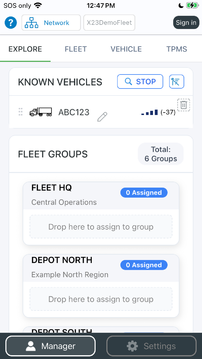
Live scan surfaces unassigned vehicles
Discovered Trains snap into their Groups automatically
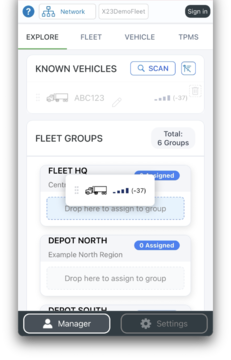
Drag-and-drop into Groups — No typing
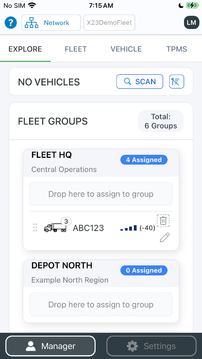
Producers publish live status to the Fleet
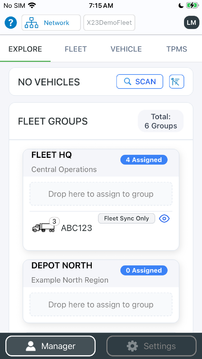
Consumers view shared Trains — Privacy stays in your hands


Fleet — monitor your whole operation at a glance
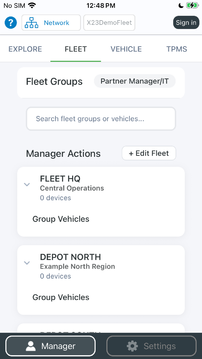
Organize your operation into Fleets
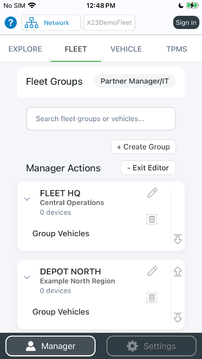
Create Groups for yards, routes or customers
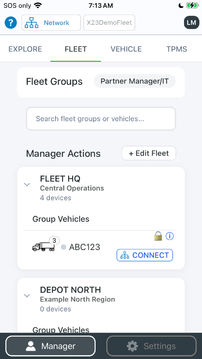
Every Train grouped and monitored
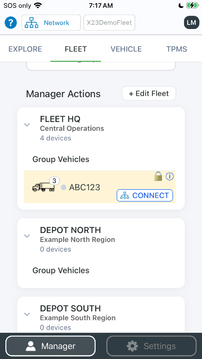
Scanned Trains merge with shared Fleet data
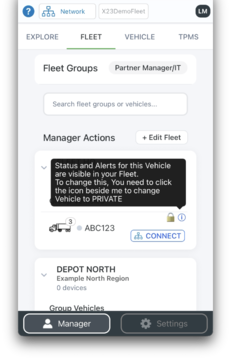
Choose exactly which Trains you share
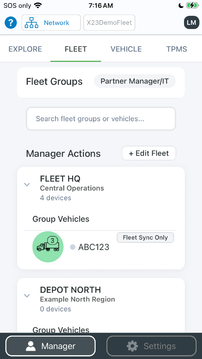
Green — All sensors healthy
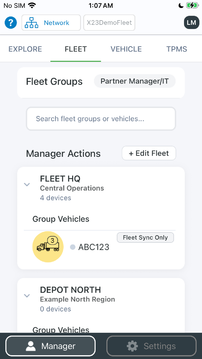
Amber — An alert needs attention
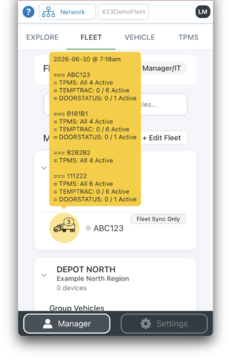
Drill into any alert for detail


TPMS — tire pressure & temperature
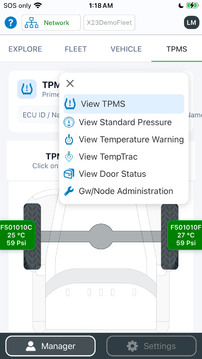
One menu, five monitoring systems
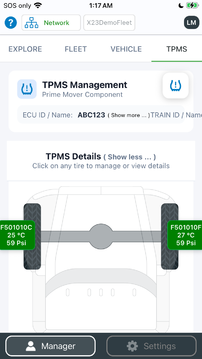
Tap any tire for full detail
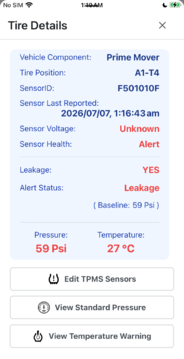
Pressure, temperature, battery and sensor ID
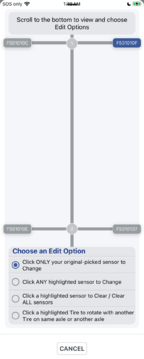
Assign sensors by QR / Barcode scan
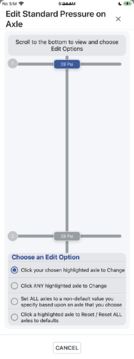
Set standard-pressure baselines
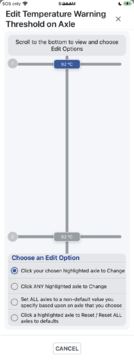
Configure temperature-warning thresholds


Standard Pressure & Temperature Warning
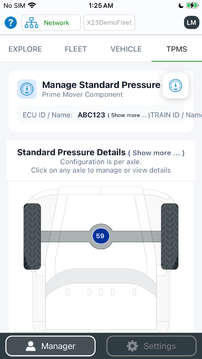
Pressure deviation at a glance
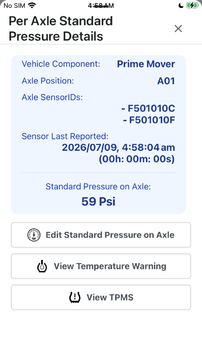
Over- and Under-inflation flagged automatically
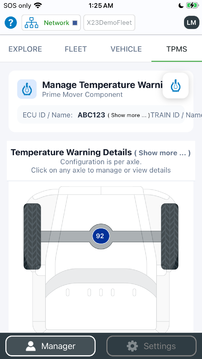
Temperature-warning summary
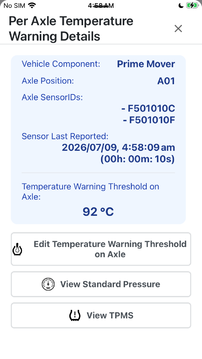
Hot-running tires caught early


TempTrac — multi-zone reefer temperature
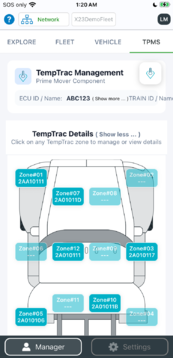
Monitor multiple reefer zones
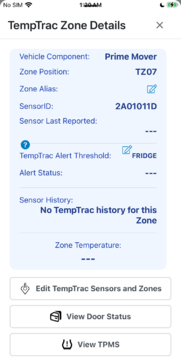
Per-zone temperature detail
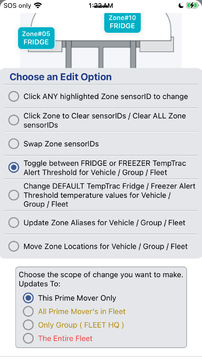
Define temperature zones
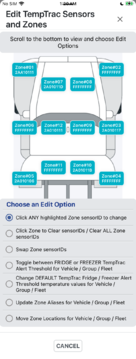
Map sensors to each zone


Door Status
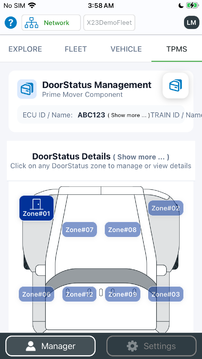
Open / Closed at a glance
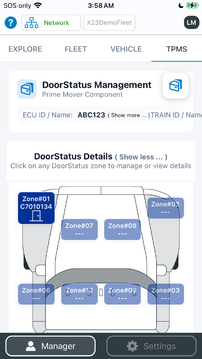
Live status per door
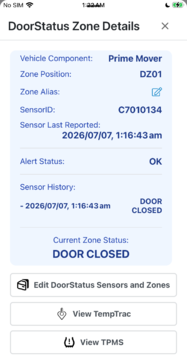
Per-zone door monitoring
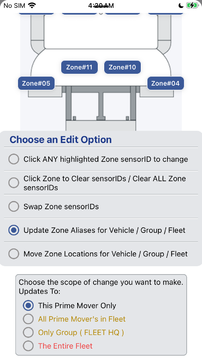
Define door zones
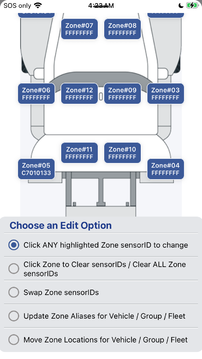
Assign door sensors


Account & Administration
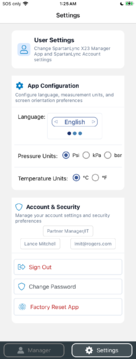
Sign in to unlock Fleet-Share and cloud history
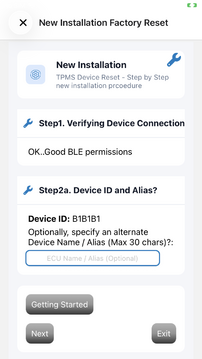
Advanced diagnostics and firmware tools


Privacy
See the X23 Manager Privacy Policy for how the App handles your data, including Fleet-Share.
Support
Questions? Contact us at support@spartanlync.com. That exact line is already fixed in the version I gave you a moment ago — it now reads Amber — An alert needs attention. If you're still seeing the lowercase "an", you're looking at the live wiki page, which won't change until you paste the latest full page in and purge.
But your feedback tells me something useful: the same rule should apply to the section sub-headings, which I hadn't caught. Those use the same Label — description format with a lowercase word after the dash:
Explore — discover… → Explore — Discover… Fleet — monitor… → Fleet — Monitor… TPMS — tire pressure… → TPMS — Tire pressure… TempTrac — multi-zone… → TempTrac — Multi-zone… I've applied that here so you don't have to flag them one by one. Full page below.
Product Page Paste into https://help.spartansense.com/PublicHome/Software/Products/SplX23
SpartanLync X23 is a complete tire, temperature and door monitoring system for your fleet.
It pairs rugged Gateway/Node hardware on the vehicle with the cross-platform X23 Manager (X23-Mgr) App — so a driver, technician or fleet manager can see the health of every wheel, reefer zone and door at a glance, at the vehicle or across the Fleet.
This page is a resource for SpartanLync Customers and Partners.
What is the X23 System?
The X23 System has two parts that work together:
- Gateway/Node hardware
- A rugged on-vehicle device. It reads TPMS, TempTrac and Door sensors over the J1939 / CAN bus and groups tractors, trailers and dollies into a "Train". It links to your phone, tablet or desktop over Bluetooth (BLE) or a wired CAN adapter.
- X23 Manager (X23-Mgr) App
- The client software on this page. It discovers Trains, shows their sensors on photoreal vehicle graphics, configures the TPMS controller, and — once you sign in — securely shares live Train status across your Fleet.
Photoreal graphics for a full Train — Tractor, trailer (up to 7 axles) and dolly (up to 2 axles)
Discover every Train — Over the CAN bus or Bluetooth
Live pressure and temperature on every wheel
Key Features
- All your sensors, one App — TPMS pressure & temperature, standard-pressure baselines, temperature-warning thresholds, TempTrac reefer zones and Door Status.
- Every platform — Native apps for iOS, Android, Windows and macOS (Intel & Apple Silicon).
- Two ways to connect — Bluetooth (BLE) on mobile, or a wired RP1210 / USB-Serial CAN adapter on desktop.
- Fleet-Share — Sign in to publish live Train status to your Fleet, and view Trains shared by others. Always behind a secure login, always owner-controlled.
- Drag-and-drop setup — Scan your fleet, drop vehicles into Fleets and Groups. No typing.
- Guided wizards — Configure Nodes and the TPMS controller from scratch; assign sensors by scanning a QR / Barcode.
- Firmware updates — Update the TPMS Controller right from the Desktop App.
- Multi-lingual — English, Spanish and French.
Get the App
Available for mobile and desktop:
- Android — Get X23-Mgr on Google Play
- Apple iOS / iPadOS — Download on the Apple App Store
- Windows / macOS Desktop — Download the X23-Mgr Desktop App
Open the Explore tab and the App scans for nearby Trains automatically — over Bluetooth on mobile, or your CAN adapter on desktop.
Sign in with your SpartanLync account to unlock Fleet-Share.
Gallery Tour
A screen-by-screen tour of the App. Click any image to enlarge.
Explore — Discover and organize your fleet
Live scan surfaces unassigned vehicles
Discovered Trains snap into their Groups automatically
Drag-and-drop into Groups — No typing
Producers publish live status to the Fleet
Consumers view shared Trains — Privacy stays in your hands
Fleet — Monitor your whole operation at a glance
Organize your operation into Fleets
Create Groups for yards, routes or customers
Every Train grouped and monitored
Scanned Trains merge with shared Fleet data
Choose exactly which Trains you share
Green — All sensors healthy
Amber — An alert needs attention
Drill into any alert for detail
TPMS — Tire pressure & temperature
One menu, five monitoring systems
Tap any tire for full detail
Pressure, temperature, battery and sensor ID
Assign sensors by QR / Barcode scan
Set standard-pressure baselines
Configure temperature-warning thresholds
Standard Pressure & Temperature Warning
Pressure deviation at a glance
Over- and Under-inflation flagged automatically
Temperature-warning summary
Hot-running tires caught early
TempTrac — Multi-zone reefer temperature
Monitor multiple reefer zones
Per-zone temperature detail
Define temperature zones
Map sensors to each zone
Door Status
Open / Closed at a glance
Live status per door
Per-zone door monitoring
Define door zones
Assign door sensors
Account & Administration
Sign in to unlock Fleet-Share and cloud history
Advanced diagnostics and firmware tools
Privacy
See the X23 Manager Privacy Policy for how the App handles your data, including Fleet-Share.
Support
Questions? Contact us at support@spartanlync.com.
