Difference between revisions of "PublicHome/Software/Products/SplTools"
| Line 41: | Line 41: | ||
Its important to understand that to use SpartanLync Map, SpartanLync Tools '''MUST FIRST be installed and run''' using the steps below: | Its important to understand that to use SpartanLync Map, SpartanLync Tools '''MUST FIRST be installed and run''' using the steps below: | ||
| − | === | + | ===Step 1.=== |
| − | + | A Geotab customer <strong>with Administrator privileges</strong> must first log into theor Geotab fleet database using the web-based [https://my.geotab.com MyGeotab] fleet management software. | |
| + | |||
| + | ===Step 2.=== | ||
| + | Install the '''SpartanLync Tools''' Add-in using the JSON code below. This code is copy/pasted into the following MyGeotab screen <strong class="tiny">( Administration -> System -> System Settings -> Add-Ins Tab -> New Add-In button )</strong> and then SAVE the changes. | ||
<pre> | <pre> | ||
| Line 60: | Line 63: | ||
</pre> | </pre> | ||
| − | === | + | ===Step 3.=== |
| − | + | Run '''SpartanLync Tools''' from the left-side menu by clicking its menu item ( https://help.spartansense.com/geotab/spltools/images/spartanlync-tools-menu.svg ). | |
| + | |||
| + | ===Step 4.=== | ||
==SpartanLync Tools Documents== | ==SpartanLync Tools Documents== | ||
Revision as of 13:27, 24 September 2020
SpartanLync Tools (MyGeotab App Integration) documentation available to SpartanLync Customers and Partners
What is SpartanLync Tools
SpartanLync Tools is a Mobile, Tablet and Desktop Web Application that operates as a MyGetoab plugin, technically called an Add-In, within the MyGeotab platform.
SpartanLync Tools gives Geotab customers the ability to Discover, Monitor, and Report on SpartanLync devices and sensors installed into fleets of vehicles installed with a Geotab GO device.

Mobile / Tablet / Desktop Views

TempTrac and TPMS Temperature
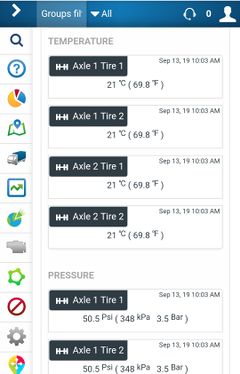
Temperature & Pressure Monitoring
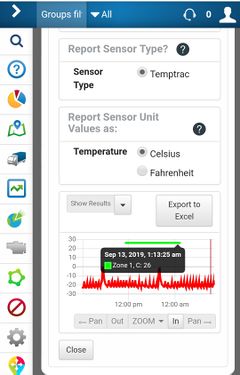
Sensor data shown in Graph or Table / Exportable to Excel

Sensor Data Report options
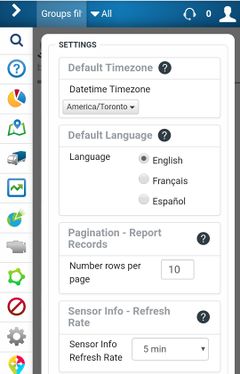
International:
Multi-Language and Timezone support


The app graphically and tabularily reports on SpartanLync TPMS / Temptrac Pressure and Temperature sensor data values. The current or historical sensor data can then be exported for CSV download into Excel.
Additionally, real-time vehicle location and fault history is easily shown for installation troubleshooting and fleet monitoring.
What is SpartanLync Map
SpartanLync Map is a Mobile, Tablet and Desktop Web Application companion to SpartanLync Tools that allows MyGetoab users to
- View their fleet of vehicles in real-time on a map or to
- Playback the location of vehicles in their fleet at points of time in the past
Additionally, Vehicle Status and Exception events can also be viewed in real-time.
Mobile / Tablet / Desktop Views
TempTrac and TPMS Temperature
Installation / Operating with a Geotab Database
SpartanLync Tools and SpartanLync Map requires a Geotab database from which to operate.
Its important to understand that to use SpartanLync Map, SpartanLync Tools MUST FIRST be installed and run using the steps below:
Step 1.
A Geotab customer with Administrator privileges must first log into theor Geotab fleet database using the web-based MyGeotab fleet management software.
Step 2.
Install the SpartanLync Tools Add-in using the JSON code below. This code is copy/pasted into the following MyGeotab screen ( Administration -> System -> System Settings -> Add-Ins Tab -> New Add-In button ) and then SAVE the changes.
{
  "name": "SpartanLync Tools",
  "supportEmail": "support@spartanlync.com",
  "version": "1.0.1.01",
  "items": [{
    "url": "https://help.spartansense.com/geotab/spltools/splgeotabtools.html",
    "path": "",
    "menuName": {
      "en": "SpartanLync Tools"
    },
    "icon": "https://help.spartansense.com/geotab/spltools/images/spartanlync-tools-menu.svg"
  }]
}
Step 3.
Run SpartanLync Tools from the left-side menu by clicking its menu item ( https://help.spartansense.com/geotab/spltools/images/spartanlync-tools-menu.svg ).
Step 4.
SpartanLync Tools Documents
Product / Support / F.A.Q
- FAQ - Frequently Asked Questions
- TBA - SpartanLync Tools User Guide
